



Access conditions
I’ll link access to the agreed successful payment or approval event and test the relevant incomplete or unsuccessful joining scenarios.

I build membership funnels that explain your programme, guide enrolment and connect the agreed payment or approval route to member access and a useful welcome.
Choose a membership funnel when the decision includes enrolment and access to a programme or member area. A sales funnel may sell the offer; the membership scope also covers the joining and access experience.
Compare with Sales Funnels →I’ll design your programme page and configure the agreed checkout or application route. Enrolment, access and welcome messages will reflect your offer and delivery platform.
You get a joining experience checked against your programme terms, including the first steps a new member receives.
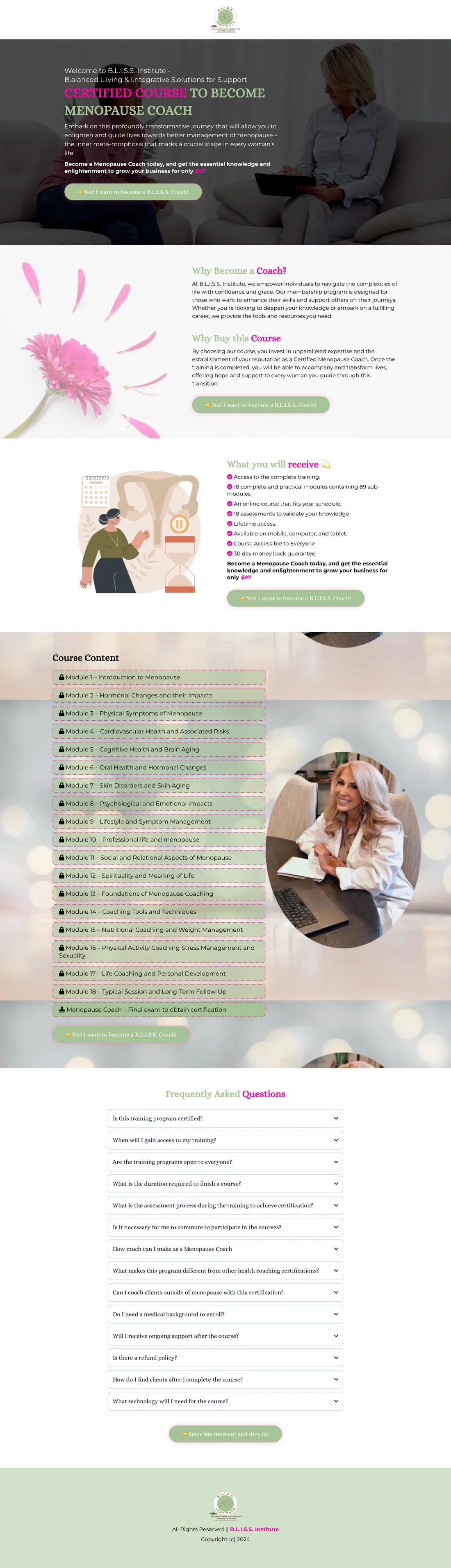
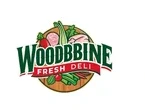
Explore original project screenshots and their documented page purpose.













I’ll set up the agreed journey alongside your page design.
I’ll map your programme, pricing, support and access terms.
I’ll design the membership page around the value members receive.
I’ll connect the agreed checkout or application to enrolment.
I’ll test access and welcome information, then walk you through the setup.
I’ll connect the joining condition, access and welcome within the agreed platform scope. Payment and renewal arrangements will reflect your actual offer rather than assumed membership features.
I’ll link access to the agreed successful payment or approval event and test the relevant incomplete or unsuccessful joining scenarios.
I’ll prepare the message that shows members where to sign in, what to do first and how to reach support.
I’ll define the route for access questions and approved programme updates, including renewal behaviour only where it belongs to the scope.
I’ll present your approved audience, curriculum, delivery format, support and access terms, then align the joining route with what members receive.
Yes. I’ll configure the agreed application and approval route before access, rather than using payment as the entry condition.
No. I’ll configure the supported billing model your offer uses, whether that is a one-time fee, payment plan or recurring arrangement.
BLISS shows a programme presentation with curriculum and enrolment information. For your project, I’ll scope member access, payment and support around your own platform and offer.
I’ll build the programme page, joining route and welcome around the membership experience you deliver.