



A balanced editorial hero
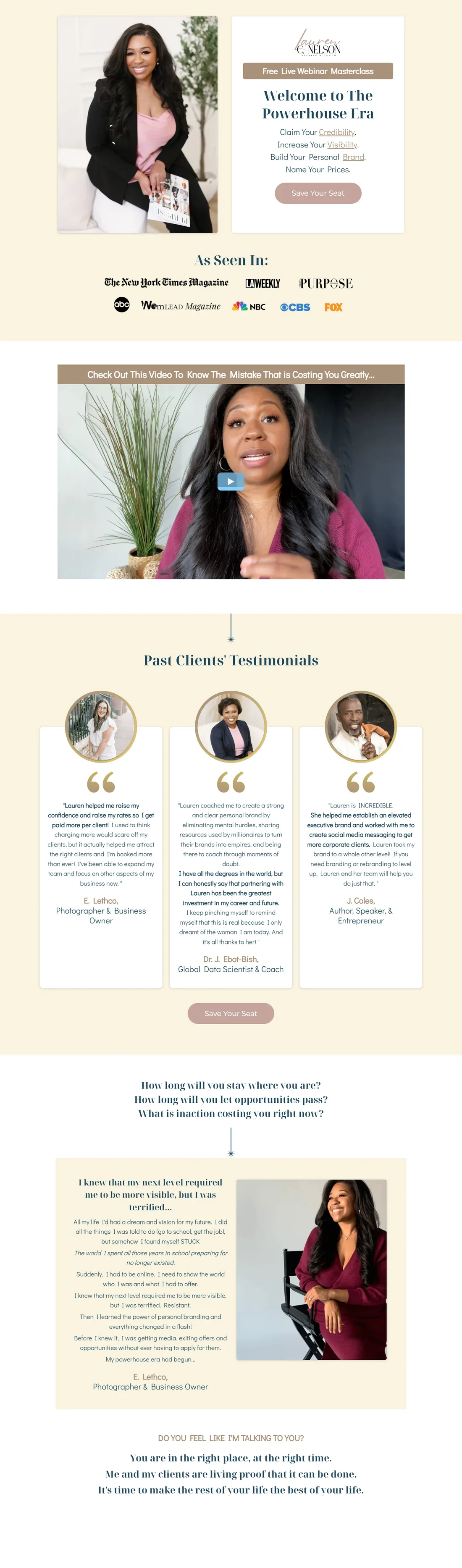
Lauren Nelson’s seated portrait sits beside the masterclass title and a muted Save Your Seat button.

A personal-brand webinar page introduces Lauren Nelson’s Powerhouse Era masterclass with portraits, a presenter video, media-logo strip and client testimonials, repeatedly inviting visitors to save a seat for the session.
Three choices that shape the visitor’s experience on this page:
Lauren Nelson’s seated portrait sits beside the masterclass title and a muted Save Your Seat button.
Cream backgrounds, teal headings and soft rose buttons repeat through the page.
A media-logo strip, large video still, portrait testimonials and a longer client story appear as separate sections.
The Powerhouse Era masterclass needed to introduce its presenter and make the session feel credible before asking visitors to save a seat.
I designed the visible registration page around Lauren’s portrait, masterclass title, presenter video, media references, client stories and repeated seat-saving prompts.
The original Trello project and portfolio screenshots show the cream, teal and rose design, speaker material, media strip, video and testimonials.
The page presentation is documented. Registration volume, attendance, reminder delivery and post-event sales are not established by this evidence.













I designed the visible registration page around Lauren’s portrait, masterclass title, presenter video, media references, client stories and repeated seat-saving prompts.
The original Trello project and portfolio screenshots show the cream, teal and rose design, speaker material, media strip, video and testimonials.
The page presentation is documented. Registration volume, attendance, reminder delivery and post-event sales are not established by this evidence.
I’ll organise your speaker assets, event details and registration route so guests know exactly what they are joining.